

⚡ Quick Summary
A Wireless BMS (Wireless Building Management System) is a building control approach that uses wireless sensors, room controllers, and gateways to add monitoring, control, and automation to a building without installing extensive new low voltage cabling. It is most often used to modernize existing buildings, where running new cable is disruptive and costly.
A Wireless BMS typically has four layers:
• Wireless field devices: temperature, humidity, CO2, occupancy, leak, and setpoint sensors plus wireless thermostats
• Gateway or edge layer: receivers or protocol gateways that feed wireless data into the wider system (for example via BACnet)
• Supervisory platform: a local BAS or cloud BMS for alarms, trends, rules, and remote access
• Application layer: occupancy based HVAC, IAQ monitoring, fault detection, and portfolio analytics
Why it matters: It lowers installation cost and disruption, speeds sensor expansion, and improves room and zone visibility, making it the most practical path to smarter control in existing buildings.
 A lot of buildings do not need a full controls replacement. They need a smarter way to extend what is already there.
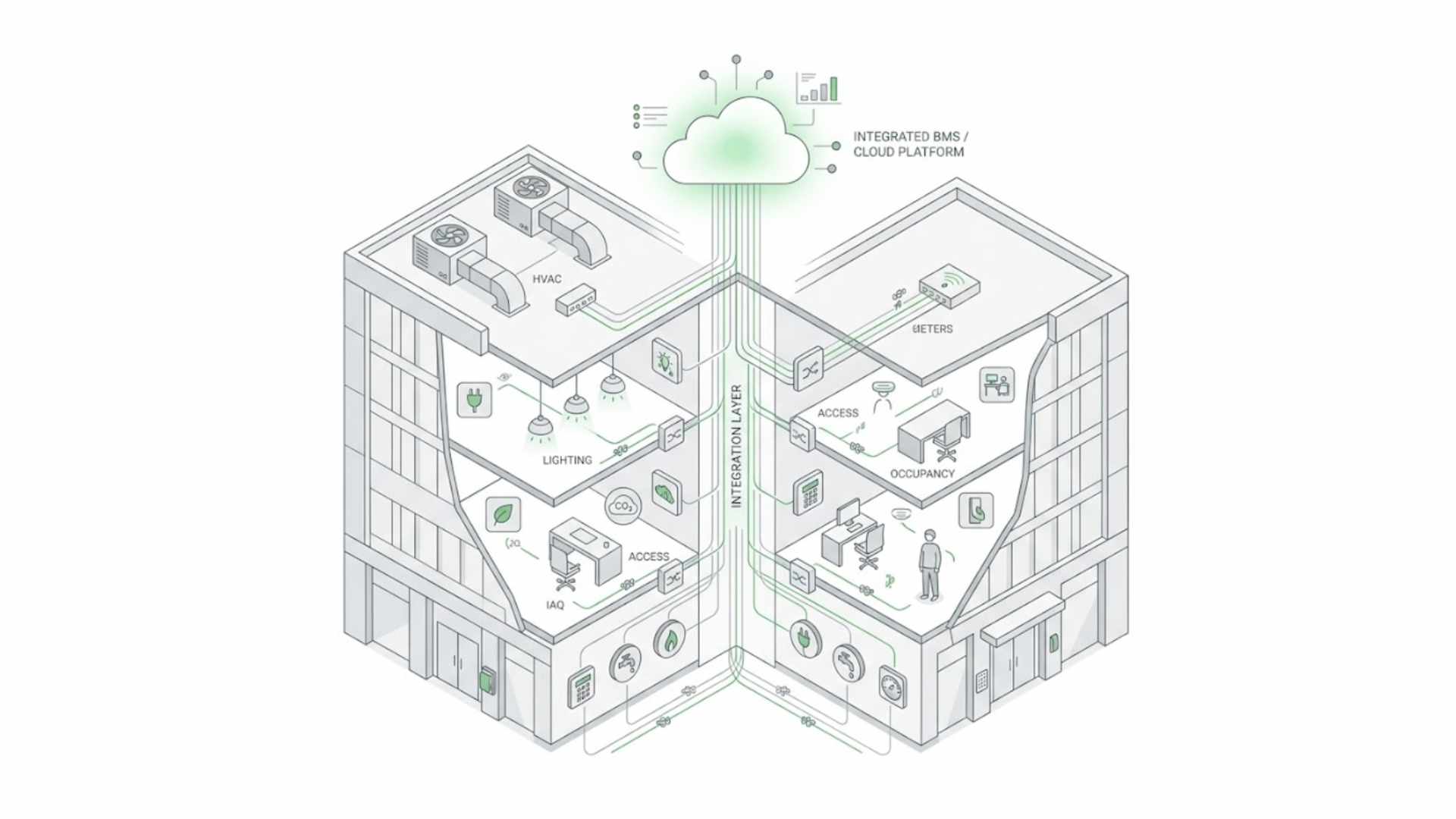
That is where Wireless BMS starts to make sense. In practical terms, a Wireless BMS is a building management approach that uses wireless field devices, sensors, room controls, and gateways to extend monitoring, control, and automation without depending entirely on new low-voltage cabling. It is especially relevant in existing buildings where opening ceilings, pulling new wires, and disturbing operations can turn a simple controls upgrade into a painful project. DOE has explicitly described low-cost wireless sensors as an enabling technology for commissioning, demand-controlled ventilation, fault detection, and optimal whole-building control.
It is not just “wireless sensors in a building”
That is the first thing worth clearing up.
Wireless BMS is not simply a box of battery devices stuck onto walls. The real value comes from how those wireless points connect into the wider control architecture. In a strong setup, wireless devices feed usable data into controllers, gateways, BACnet objects, cloud dashboards, or rules engines so the building can actually respond. The LoRa Alliance puts this clearly: LoRaWAN-enabled sensors can work as a unique solution or integrate and enhance other BMSs and BACnet. Schneider’s Viconics materials make a similar point by showing wireless room-control networks whose points are visible through BACnet and oBIX, and that can be used for wired and wireless zone control in larger buildings.
Why buildings are moving this way
The short answer is retrofit reality.
New construction can plan wiring from day one. Existing buildings usually cannot. DOE notes that retrofitting buildings with the instrumentation needed for better building-management systems is harder than outfitting them during new construction, and adds that wired sensor installation is often cost-prohibitive in retrofit applications. KMC’s wireless-sensor guidance says almost the same thing from the field side: wireless sensor networks can provide lower installation costs and increased flexibility, especially in retrofit work.
That is why wireless BMS matters so much in real projects. It lowers the barrier to adding room sensing, zone visibility, occupancy information, humidity, CO2, setpoint feedback, and other data points that older buildings often lack. And once those points exist, the building becomes much easier to optimize, not only for comfort but also for commissioning, FDD, and smarter HVAC sequences. DOE’s research-and-development roundtable ties wireless sensors directly to those higher-value building strategies.
What a Wireless BMS usually includes
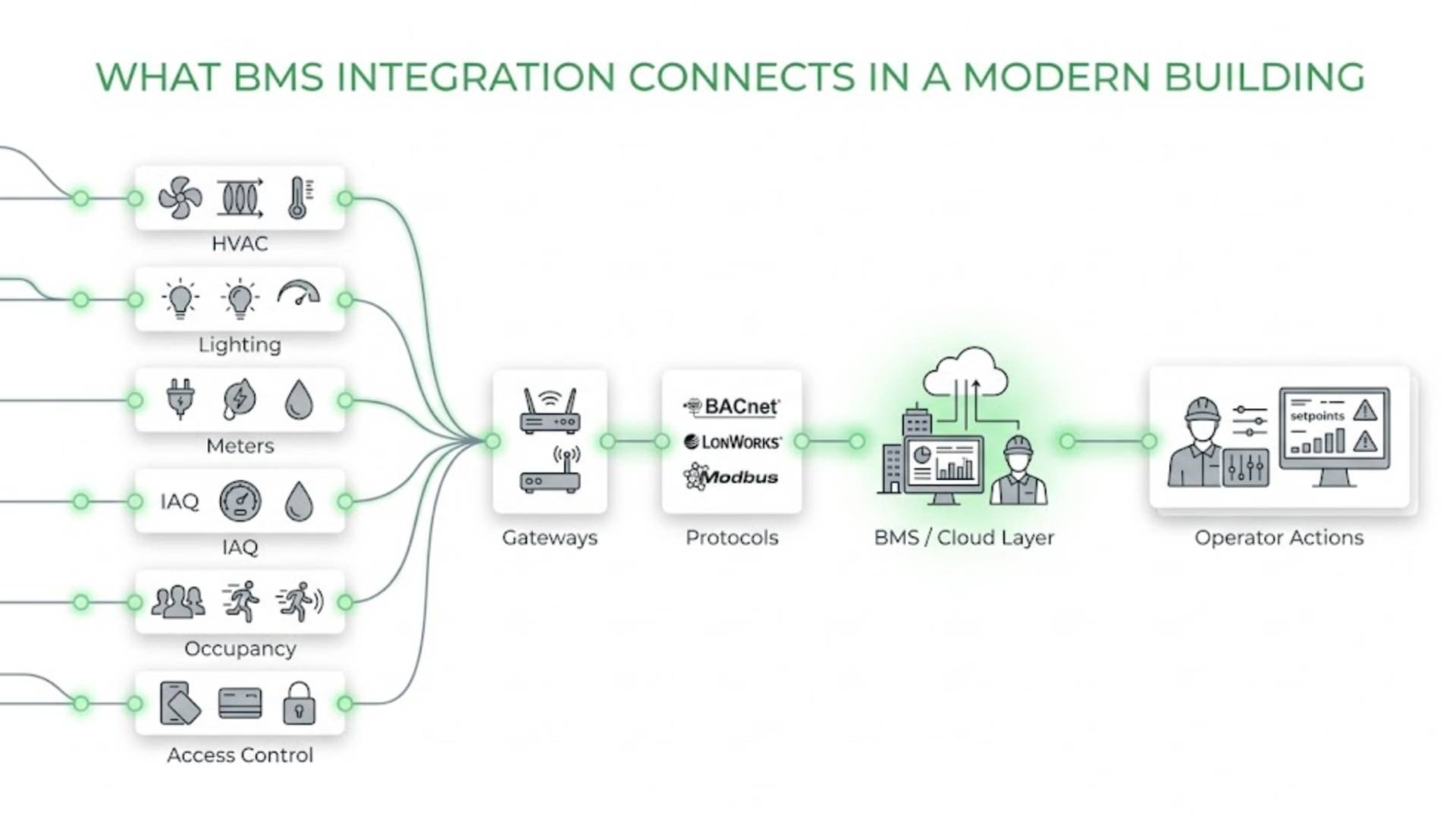
A practical Wireless BMS setup usually has four layers.
First, wireless field devices. These can include temperature, humidity, occupancy, CO2, setpoint, leak, or people-count sensors, along with wireless room controllers or thermostats depending on the use case. KMC’s documentation, for example, shows wireless temperature and humidity sensors feeding controller networks for RTUs, HPUs, FCUs, AHUs, VAVs, and unit ventilators.
Second, a gateway or edge layer. This is what brings the wireless field layer into the wider automation system. In practice, this may be a protocol gateway, wireless receiver, or controller-gateway combination. Schneider’s Viconics material describes a wireless gateway that configures Zigbee end devices and exposes points through BACnet and oBIX. KMC similarly shows gateways sitting between wireless sensors and control networks.
Third, the BMS or supervisory platform. This may be a local BAS front end, a cloud-based BMS architecture, or both. The key point is that the wireless layer should not stay isolated. It should land inside a usable operating system for alarms, trends, rules, and actions. The LoRa Alliance’s smart-buildings material points directly toward this model by positioning LoRaWAN sensors as a way to integrate with and enhance existing BMS and BACnet environments.
Fourth, the application layer. This is where the upgrade becomes valuable. Wireless points can support better room control, occupancy-based HVAC logic, IAQ monitoring, fault detection, remote building monitoring, and portfolio analytics. ASHRAE Guideline 13 explicitly frames BAS as an ongoing commissioning and performance-monitoring tool, and as an integral component for FDD.
What Wireless BMS is actually good for
Wireless BMS is strongest where buildings need more data and better control, but cannot justify invasive rewiring.
That often includes hotels, schools, offices, retail spaces, light commercial buildings, public-sector retrofits, and older mixed-use properties. In those environments, the wireless layer helps fill the operational blind spots that many legacy BMS setups still have: no room-level humidity, no useful occupancy signal, weak zone visibility, and limited sensing in spaces that were never instrumented properly in the first place. DOE’s retrofit guidance and wireless-sensor research both point toward exactly this value proposition.
This is also why wireless retrofits for existing buildings are such a strong theme in the cluster. The wireless layer is not the whole modernization story, but it is often the part that makes the rest of the story possible. Once you can capture more real conditions from rooms and zones, the building becomes much easier to optimize.
Wireless BMS and LoRaWAN
Not every Wireless BMS uses the same communication approach, but LoRaWAN has become one of the most relevant options for smart-building retrofits because of its long-range, low-power profile and its fit for battery-powered sensing. The LoRa Alliance positions LoRaWAN for smart buildings as a way for facilities and campuses to be managed efficiently and proactively, and specifically notes that LoRaWAN sensors can integrate with existing BMS and BACnet systems. That makes LoRaWAN connectivity especially important when the goal is to add sensing coverage quickly without rebuilding the controls infrastructure.
That said, Wireless BMS should not be reduced to one protocol. Zigbee-based room control, EnOcean sensors, and other wireless approaches also play real roles depending on the application. KMC’s product literature highlights EnOcean-based energy-harvesting wireless sensors, while Schneider’s Viconics material shows Zigbee Pro wireless room-control networks. The practical lesson is simple: the “best” wireless choice depends on whether you are solving for room control, sensor expansion, protocol compatibility, battery life, or a wider wireless BMS approach using LoRaWAN.
What good practice looks like now
The better Wireless BMS projects usually get three things right.
First, they do not try to make wireless do everything. Fast equipment-level control still often belongs in local controllers. Wireless adds the most value where sensing gaps, room-level visibility, or retrofit constraints are the real problem. DOE’s research frames wireless sensors as enabling technologies, not magic replacements for every control layer.
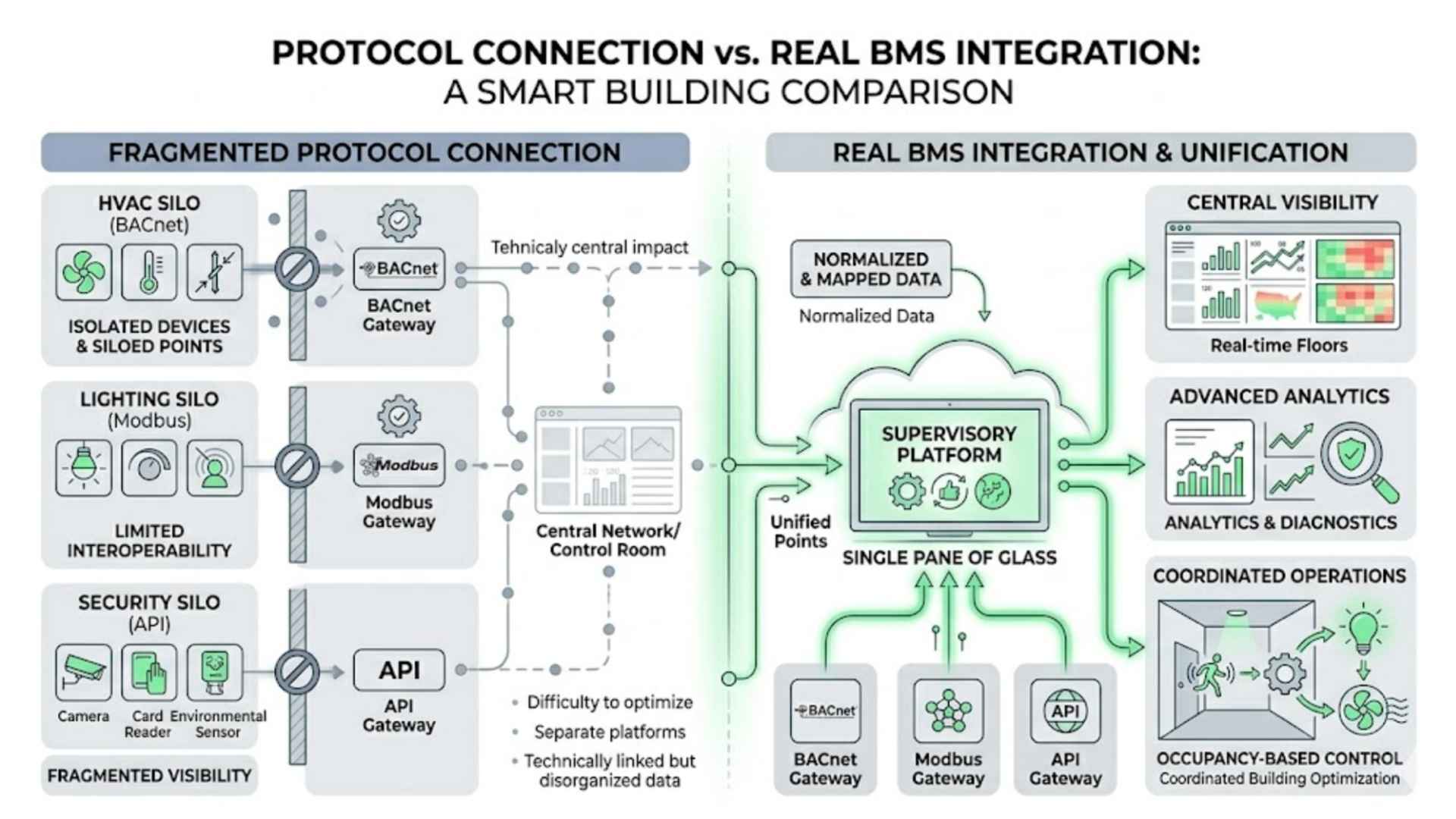
Second, they treat wireless as part of the broader smart building platform rather than a standalone gadget layer. That means thinking early about gateways, BMS integration, naming, point mapping, cybersecurity, and how wireless data will actually trigger decisions. DOE’s retrofit-deployment material flags security and reliability concerns as real buyer considerations, which is a reminder that good architecture still matters.
Third, they focus on the use cases that benefit most from flexibility: occupancy-informed HVAC, IAQ expansion, room-level thermal visibility, remote monitoring, and non-invasive retrofitting. That is where Wireless BMS usually produces the clearest operational return.
Wireless BMS vs Cloud BMS
These two terms are related, but they are not the same thing.
Wireless BMS describes how field data and some control points are added or extended without heavy wiring. Cloud BMS describes where the supervisory visibility, analytics, and remote-management layer lives. In many modern projects, the most useful architecture combines both: a wireless field layer feeding a cloud-based BMS architecture that gives teams remote access, trends, alarms, and multi-site visibility. That is why this page naturally fits inside a smart building platform and should connect closely to Cloud BMS.
Final thought
Wireless BMS is not important because “wireless” sounds modern.
It is important because it gives existing buildings a more practical path to better control.
Less disruption.
More flexibility.
Faster sensor expansion.
Better room and zone visibility.
A stronger base for optimization.
That is why Wireless BMS matters. In many buildings, it is the most realistic way to add intelligence without forcing a full controls replacement. And for teams evaluating a fits inside a broader smart building platform story, that makes it one of the most useful modernization steps available.
